Uniqueness Techniques
Introduction
Uniqueness techniques rely on the assumption that valid Sudoku puzzles have exactly one solution. Any configuration allowing multiple solutions must be avoided. This is not part of the Sudoku rule itself, and there is controversy about the validity of these techniques. Users can disable all Uniqueness Techniques via "Edit|Preferences|Steps" in HoDoKu.
Unique Rectangle (UR) — General Concept
A UR consists of four cells occupying exactly two rows, two columns, and two boxes, all sharing the same two candidates. Such a configuration produces two valid solutions by swapping the two candidates.
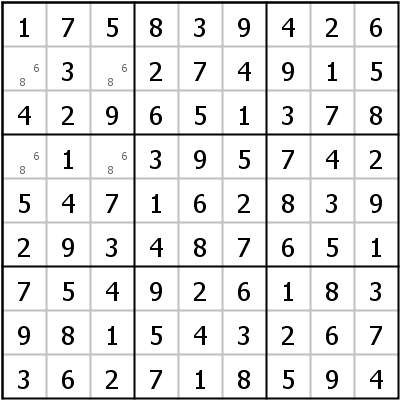
Cells r2c13 and r4c13 form a UR on candidates 6 and 8 in rows 2/4, columns 1/3, blocks 1/4.
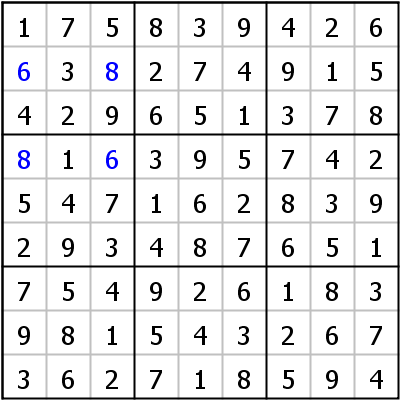
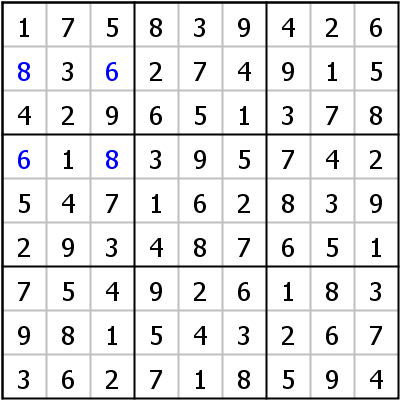
The same puzzle produces two valid solutions with 6 and 8 swapped in the four UR cells, illustrating why such a pattern must be avoided.
Binary Universal Grave (BUG)
A generalization of UR: all unsolved cells have only two candidates and every candidate appears exactly twice in every row, column, and box. Such a puzzle has two solutions.
Unique Rectangle Type 1
One of the four UR cells has additional candidates beyond the two UR candidates. To prevent the UR, at least one extra candidate must be true. Therefore, the UR candidates can be eliminated from that cell. If only one extra candidate exists, it can be placed immediately.
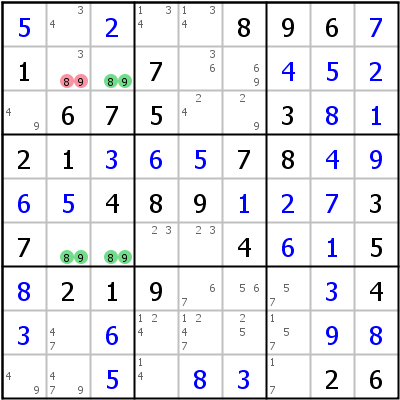
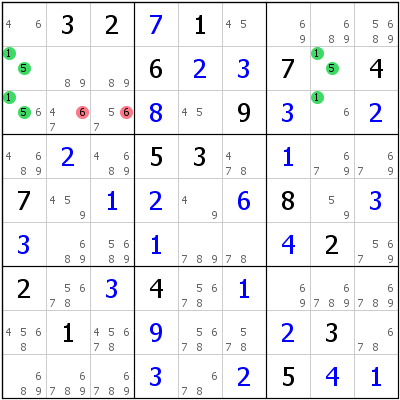
Candidates 8/9 nearly form UR in r2c23 and r6c23; extra candidate 3 in r2c2. Elimination: r2c2<>8,9 (or r2c2=3).
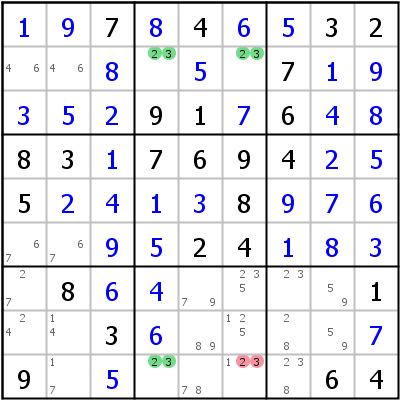
2/3 in r2c46,r9c46 => r9c6<>23 (or r9c6=1).
Unique Rectangle Type 2
Two non-diagonal cells share one extra candidate (same candidate in both). Any cell that sees both extra candidates can have that candidate eliminated.
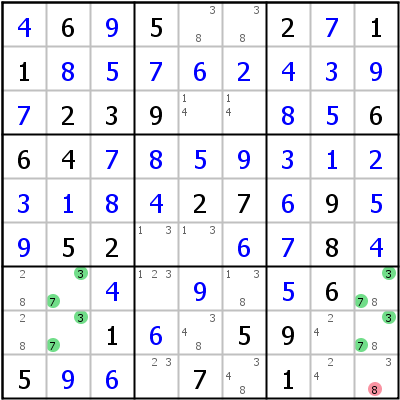
Possible UR on 3/7 in r7c29 and r8c29; extra candidate 8 in r78c9. Elimination: r9c9<>8.
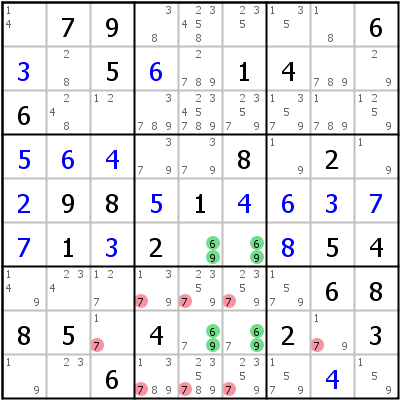
Extra 7s in r8c56 eliminate all other 7s from both row 8 and block 8.
Unique Rectangle Type 3
Combines UR with Naked/Locked Subsets. Two non-diagonal UR cells have extra candidates. Since one extra candidate must be set, these cells form a virtual cell containing only extra candidates, enabling a Naked Subset.
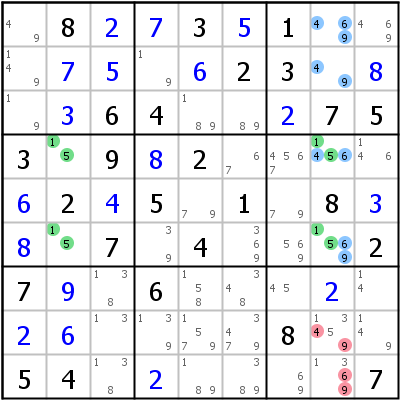
Possible UR on 1/5 in r4c28 and r6c28. r6c8 has extras 6,9; r4c8 has extras 4,6. Combined with r1c8 and r2c8, a Naked Triple on {4,6,9} eliminates those candidates from r8c8 and r9c8.
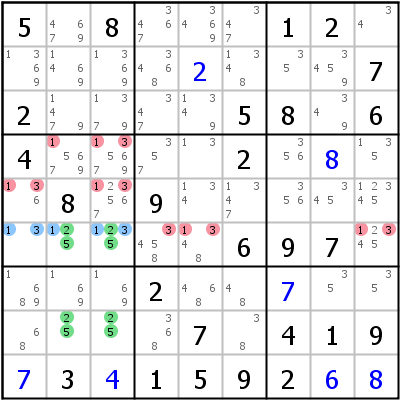
UR Type 3 with a Locked Pair: extras 1,3 in r6c23 form Locked Pair with r6c1 (locked in row 6 and block 4).
Unique Rectangle Type 4
Two non-diagonal cells have extra candidates. If one UR candidate is absent from all other cells in a house containing both extra-candidate cells, the other UR candidate can be eliminated from those cells.
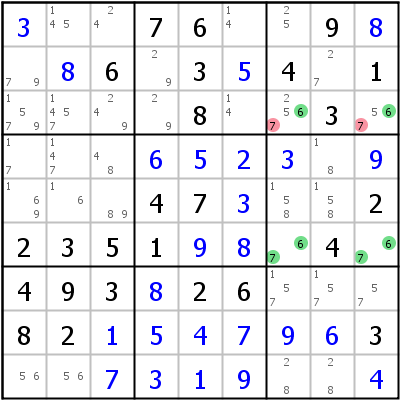
Possible UR on 6/7 in r3c79 and r6c79. Row 3 has candidate 6 only in the UR cells. Elimination: r3c79<>7.
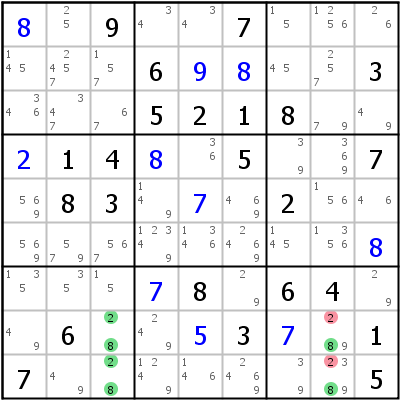
UR candidate 8 absent from column 8 (and block 9). Elimination: 2 removed from UR cells.
Unique Rectangle Type 5
Variation of Type 2 where extra candidates can appear in diagonal cells (or three cells). One extra candidate must be true; any cell seeing all UR cells containing that extra candidate can have it eliminated.
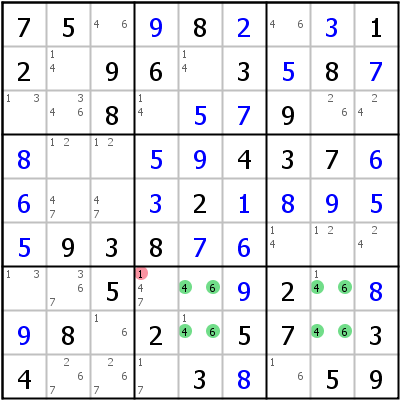
1 must be in r7c8 or r8c5 to avoid UR. r7c4 sees both cells, so r7c4<>1.
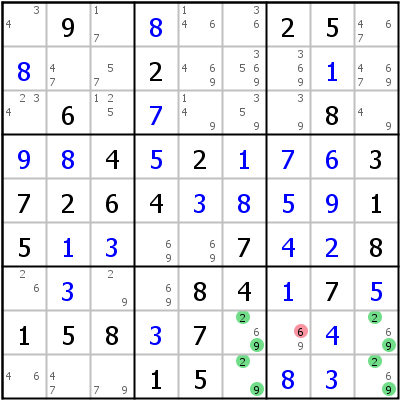
Three extra candidates (6) in r8c6, r8c9, r9c9. Elimination: r8c7<>6.
Unique Rectangle Type 6
Variation of Type 4 with two diagonal cells having extra candidates. If one UR candidate appears nowhere else in the two rows and two columns defining the UR, it can be eliminated from the extra-candidate cells. Always leads to two placements.
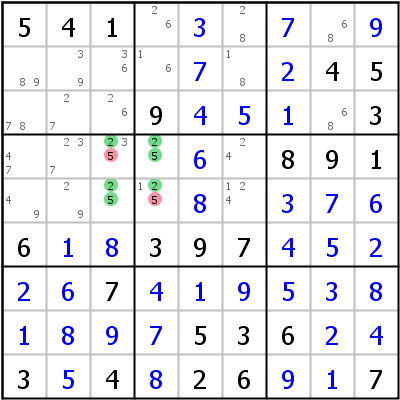
In rows 4/5 and columns 3/4, candidate 5 appears only in the UR (forming an X-Wing). Placing 5 in an extra-candidate cell would force the UR. Elimination applied to r4c3 and r5c4.
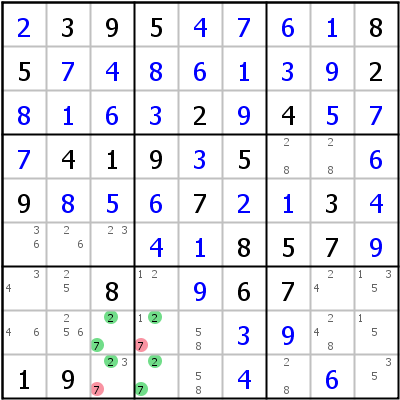
UR Type 6 on candidate 7. Every Type 6 is accompanied by a pair of Hidden Rectangles producing the same placements.
Hidden Rectangle
Works when up to three UR cells have extra candidates. Start from one UR cell without extra candidates. Check the row and column of the opposite corner. If one UR candidate appears nowhere outside the UR in those two houses, the other UR candidate can be eliminated from the opposite corner.
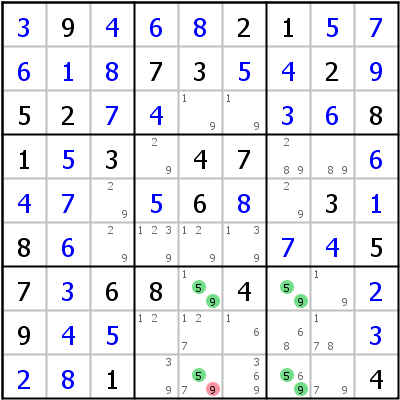
Only cell without extras: r7c7. Opposite corner r9c5 (row 9, column 5). Candidate 5 absent outside UR in those houses. Elimination: r9c5<>9.
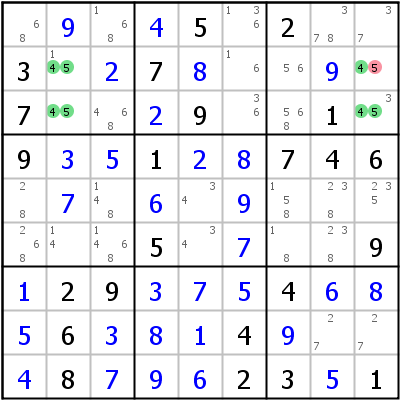
Two cells with extras. Starting from r3c2: checking row 2 and column 9, candidate 4 absent outside UR. Elimination: r2c9<>5.
Avoidable Rectangle (AR)
Differs from UR in that some UR cells are already placed (but none are givens). If none of the placed cells are givens, all UR Type rules apply. A key difference: sometimes only one of the UR candidates remains possible for the target cell.
Avoidable Rectangle Type 1
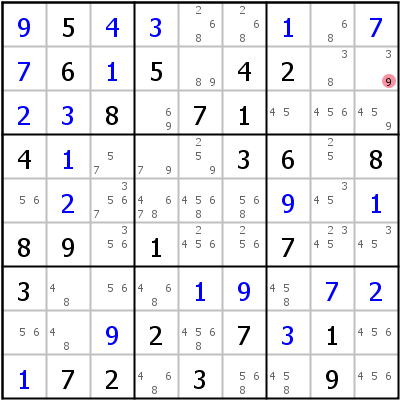
UR on 7/9 in r12c19. Only unplaced cell: r2c9; all others are not givens. Placing 9 would allow 7/9 interchange. Elimination: r2c9<>9. Logic fails if any UR cell is a given.
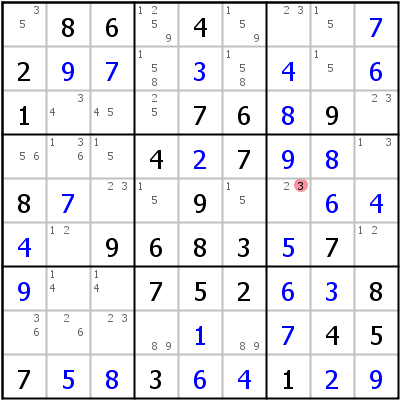
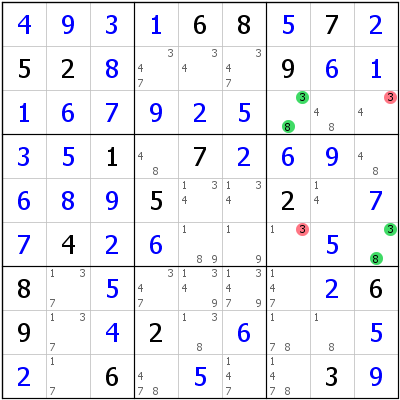
6/3 in r57c78 => r5c7<>3
Avoidable Rectangle Type 2
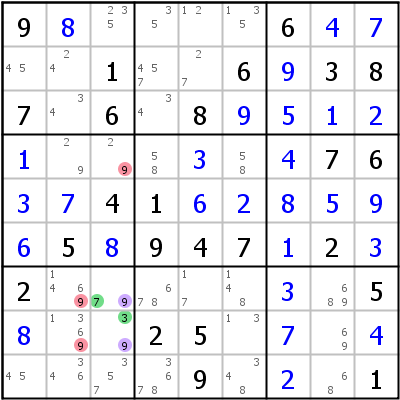
UR on 3/7 in r78c37. Neither r7c7 nor r8c7 is a given. Extra candidate 9 in r78c3. Elimination: 9 removed from all cells seeing both r8c3 and r9c3.
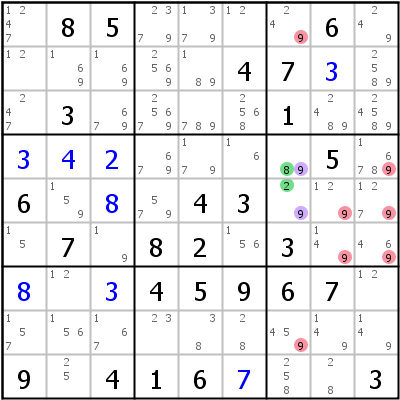
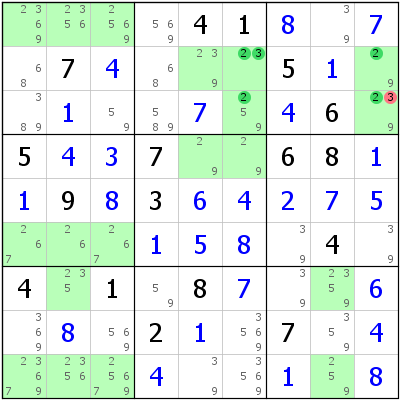
2/8 in r45c37 => r18c7,r456c9,r56c8<>9
BUG+1 (Binary Universal Grave + 1)
A possible BUG where exactly one cell has one additional candidate. That candidate must be placed to avoid the BUG.
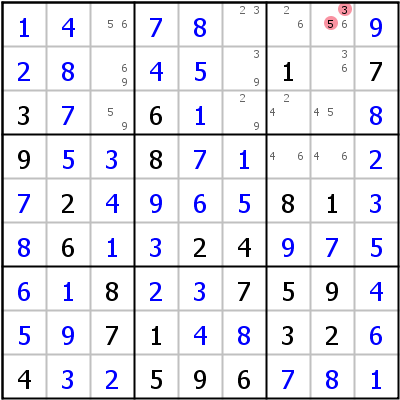
Additional candidate 6 in r1c8 (it "appears more than two times in at least one house"). Placement: r1c8=6 (or eliminate 3 and 5).
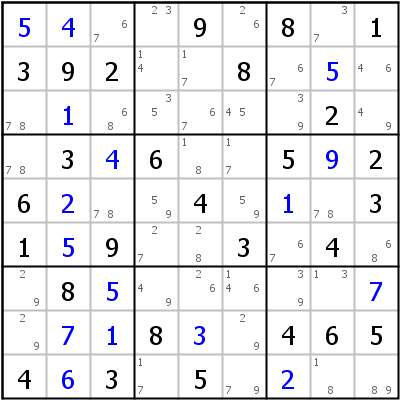
Not a BUG+1: r7c6 is the only non-bi-value cell, but row 7 has candidate 9 appearing three times (r7c147), and column 6 also fails the BUG condition.
Unique Rectangles with Missing Candidates
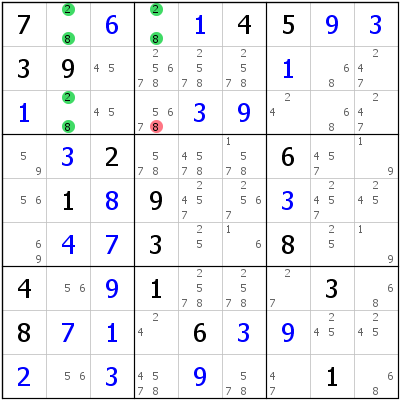
URs work even when not all UR cells hold both UR candidates. The essential condition: any UR cell could have held all UR candidates (meaning: no UR candidate in a UR cell may be blocked by a given). This matters when prior eliminations removed UR candidates. Controlled by the "Allow missing candidates in URs" option in Preferences|Steps.
Content based on HoDoKu by Bernhard Hobiger, licensed under GNU FDLv1.3.