)](https://ki-seki.github.io/posts/261107-billion-image-download/assets/billion-image-download-cover.png)
Introduction
I still remember when I first learned web crawling. Back then I had to learn many details: CSS selectors, XPath, request parsing, URL patterns. I never expected that five years later all of them would matter so little.
This post covers how I downloaded the original images in OmniCorpus-CW 1, a large-scale dataset of Chinese web images. It is an interleaved image-text corpus: each web page is stored as text paragraphs plus links to its images, mostly from WeChat, Xiaohongshu and Zhihu. Such images are valuable for training text-to-image models.
I know the basics of crawling but had never crawled at scale. With AI, I got it done cheaply, quickly and reliably: 95 Hetzner cloud servers, $175 in machine costs, and 2,973,430,108 images saved (99.62%) in 79 hours 25 minutes, 744 TB in all, averaging about 10,000 images and 2.6 GB per second.
Over those three days the AI agent did almost all the operations: patrols, rate tuning, creating and deleting machines, incident handling and billing. I only made the decisions that cost money, added resources or carried risk.
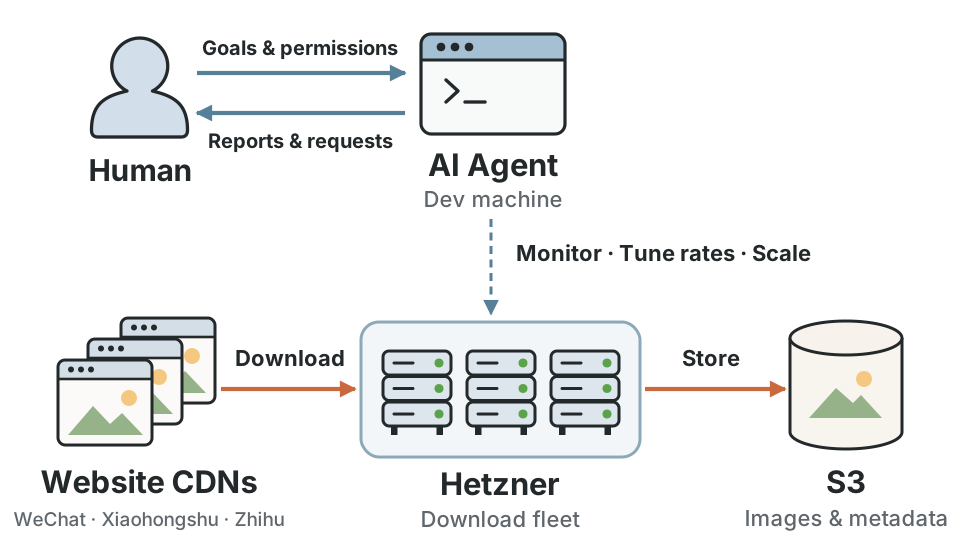
Figure 1: The human gives the AI agent goals and permissions; the agent operates the Hetzner download fleet, which moves images from website CDNs into S3.
Letting an AI Agent Run the Operations
I used Claude Code (CC) 2 with Opus 5.5 to run the whole crawling system. CC lived on a dev machine and ran nonstop. The agent isn’t cheap: at Opus 5.5 API list prices, its tokens are worth about $500, nearly 3 times the machine cost. I suspect a model this strong isn’t needed; today’s DeepSeek 4 might do, with a bit more human attention.
Hetzner’s API tokens make it easy for a model to start and stop machines, so from the start I gave CC that permission and let it probe and tune download rates itself.
CC patrolled hourly by day and every 30 minutes at night, and event monitors woke it the moment something broke. Over three days its work log passed 2,600 lines. Some examples:
- WeChat rate control: After machines were added, all of them slowed down at once and in proportion. It concluded that WeChat caps the fleet’s total rate and wrote a rate controller that kept the fleet right at the cap. A control machine in the US showed that another region didn’t help; it was deleted 8 minutes later.
- Xiaohongshu speed-up: On one machine it raised the per-IP rate step by step. No challenge pages appeared even at 80 requests per second, so it settled on 70 for margin and rolled it out to the fleet in batches.
- 10,000+ small sites: It re-split their roughly 15 million rows into tasks by site and tuned each site’s rate separately. Along the way, on my decisions, it lifted the caps for a few large image hosts and dropped two sites that mostly returned 403.
- Memory: Finding machines low on memory, it restarted them one by one as planned and added swap files where swap was short.
- Retries: After the run it counted the failures and re-downloaded only the transient ones, recovering 98.3% of them for Xiaohongshu and 99.3% for WeChat.
- Dev machine reclaimed: CC’s dev machine was reclaimed, stopping CC for 1 hour 42 minutes. The credentials then expired and every machine exited cleanly. A CC session on my own computer took over: it pushed credentials from another dev machine and restarted every lane, then handed back to the original CC once its machine returned.
- Wrap-up: It deleted all 95 machines, confirmed no resources were left in the accounts, read all of the roughly 120,000 completion markers and produced the final statistics.
Prompt
Below is a fairly complete example prompt for handing a large-scale image download to an AI agent.
|
|
Interestingly, a safety-aligned AI may refuse outright to try things like solving “verify you are human” challenges; Opus 5.5 firmly refuses such requests. An unaligned AI might try to bypass them. So this post leaves that topic aside for now.
Using Hetzner from China
Plenty has been written about signing up for Hetzner, so just one point: you don’t need to make anything up. Fill in your details truthfully and you’ll pass. A passport makes identity verification easy.
New accounts start with few vCPUs, which caps how many machines you can run at once. Open a ticket through the official channel; in my case, even with a brand-new account, the quota went from 20 to 100 vCPUs in 3 days.
Thanks to Hetzner’s low prices, this large-scale download cost very little.
Conclusion
An interesting large-scale image download, led by an AI agent.
Citation
MLA
Song, Elliot Shichao. “Efficient Large-Scale Crawling with an AI Agent: 3 Days, $175, 3 Billion Original Images.” The Kiseki Log, 7 Nov. 2026, https://ki-seki.github.io/posts/261107-billion-image-download/.
BibTeX
@article{song2026billion,
  title = {Efficient Large-Scale Crawling with an AI Agent: 3 Days, $175, 3 Billion Original Images},
  author = {Elliot Shichao Song},
  journal = {The Kiseki Log},
  year = {2026},
  month = {November},
  url = {https://ki-seki.github.io/posts/261107-billion-image-download/}
}
References
-
Li, Qingyun, et al. OmniCorpus: A Unified Multimodal Corpus of 10 Billion-Level Images Interleaved with Text. 2024. arXiv, https://arxiv.org/abs/2406.08418. ↩︎
-
Anthropic. Claude Code. 2025, https://claude.com/claude-code. ↩︎